Showing posts with label Datazen. Show all posts

Tuesday, 21 June 2016

Explore Datazen Publisher - Part 1

Explore Datazen Publisher App  - Part 1


Now lets just go through the Datazen publisher app and see what it has to offer from a designing perspective.

In this blog we will go through…
Part 1
  1. Publisher App
  2. Templates
  3. Dashboard Designer Page
  4. Self Rendering Objects
  5. Surface and drill through
And in my next blog I will go through
Part 2
  1. Generate Sample Data
  2. Branding
  3. Interface size
  4. Color Banding
  5. Activities
  6. Custom shape
 
1. Publisher App
The Datazen publisher app is an app than you download on your local PC, it’s a visualization tool that helps you to publish and create dashboard, and lots more like make working folders to separate your work, branding and etc...


2. Templates 
Datazen has a set of very nice templates that can help you to go around the learning curve, my suggestion is to open each template sample one by one.

The templates looks like the first screenshot
 
3. Dashboard Designer Page  
The “Dashboard Designer Page” is the starting point of your design, but before that you can open an existing template to start your exploration, just right click on the datazen page, select “Create” then select “Start from an existing dashboard” ……
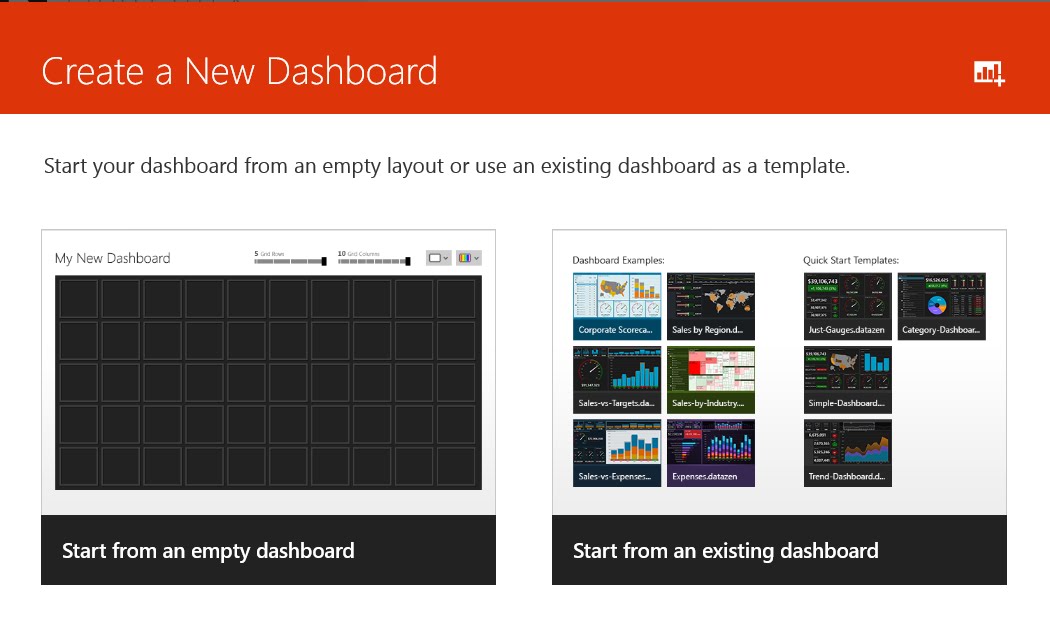
…. Select a dashboard and you are done
 
4. Self Rendering Objects 
Each visualize object that you use from the “Dashboard Element Gallery” into your “Design Surface” (know as your dashboard) has a self rendering feature, it will auto adjust its size and shape on your design surface.


5. Surface and Drill through
 
     You can drill through from one surface (dashboard) to another or even go to a SSRS report.


    Open the “Sales and Profit Overview” in the template sample you will see an small arrow within a square on the “Expenses” KPI, click on that and you will go to another surface.


After this test open the “Sales and Profit Overview” in a design mode and check the properties and settings.


Monday, 20 June 2016

Datazen? what is it and where did it come from?


In 2002 a Canadian company called ComponentArt located in Toronto started to focus on report specifically on “Mobile BI App”, and that is where datazen came from.

              They had thousands of customers and Microsoft decided to buy this company, I assume that it was taken over by Microsoft around 2014ish, and in 2016 it was a part of the Microsoft BI tool (Link) know as “SSRS Mobility Suite”. I think that the best thing that Microsoft did within SQL Server was to reconstruct the entire reporting services to an unbelievable level, and to top it all they combined SSRS, Datazen and Power BI together.

              Datazen was known to be an on perm software and it still is but you can still have datazen hosted in a virtual environment in the cloud.

What you should know about datazen is

1.      It is an Analytical tool, mainly used for Mobile and tablet.

2.      It is NOT a data discovery tool, to me this is the most important part to understand specifically when you want to start learning and designing with Datazen

3.      It is a “Touch Analyst” tool and is supported for offline usage.

4.      The best Rich interactive visualization that I have seen in years.

5.      Simplicity and rapid deployment and predefined data for designers.

A peek at Datazen publisher


Some references


Datazen, Take one a day

Hi
Some friends and co-workers asked me to blog about Datazen, so I decided to select the catchy title for it, “Datazen, Take one a day”.
I am going to write some blogs about the product Datazen and I will be adding and updating this page that is mainly focused on the Table of contents.
I just like to blog my experience and I hope that you will like it.
 Have fun.
     Nik
 
Table of content
1.           Introduction to Datazen
·          Product element
 
2.           Create and publish dashboard
·       Dashboard designer
·       Data
 
3.           Etc…